
SAP ADK: Efficient Data Management in SAP Systems
 In many companies, SAP systems grow continuously over the years. Financial documents, customer orders, purchasing data, or material movements are often stored permanently in the productive database. Even data that is no longer required for daily operations frequently remains in the system.
This leads to several challenges:
The database continues to grow, reports take longer to run, batch jobs require more time, and backup and maintenance processes become more complex. At the same time, infrastructure and storage costs increase—especially in SAP HANA systems.
Against this background, structured data management is becoming increasingly important. A key component in this context is SAP ADK archiving. It enables companies to remove historical data from the operational database while still keeping it available when needed.
What is SAP ADK Archiving?
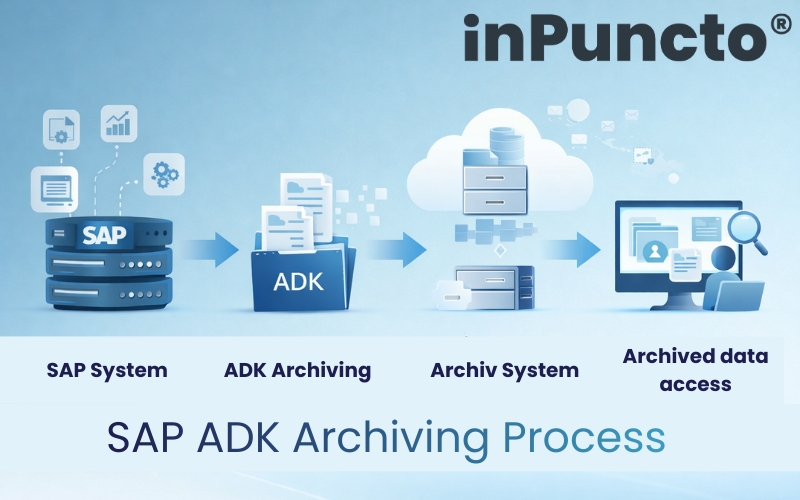
The SAP Archive Development Kit (ADK) is the standard framework provided by SAP for archiving application data. With this technology, structured business data—such as documents or transactional data—can be removed from the database and stored in archive files. The archived data remains accessible and can be displayed or searched whenever required. Companies benefit from a significantly smaller database, improved system performance, and audit-compliant retention of historical data. Another important component of SAP archiving is the integration with archive and document management systems. While structured SAP data is archived via ADK, related documents—such as invoices or PDFs—can be transferred to an archive system like the biz²ArchiveServer from inPuncto via SAP ArchiveLink.
Typical Challenges in Long-Grown SAP Systems
Many SAP systems have evolved over years or even decades. In many cases, all transactional data since the system’s initial implementation is still stored in the productive database. Typical consequences include:
- increasing database sizes and higher storage costs
- longer runtimes for reports and month-end closing processes
- increased backup and restore times
- more complex system migrations and upgrades
- growing requirements regarding compliance and data retention obligations
Especially in large SAP landscapes or in the context of S/4HANA transformations, it becomes clear how important efficient data archiving is.
How Does SAP ADK Archiving Work?
The archiving process in SAP follows a clearly defined workflow. First, archivable data is identified—for example completed business documents or historical transaction data. These data sets are then read from the database during an archiving run and written into archive files. After successful archiving, the corresponding records can be removed from the operational database. A key aspect is that archived data remains accessible. Users can still display it via familiar SAP transactions or search for it via an archive or document management system. This ensures full traceability of business processes—even if the data is no longer stored in the productive system.
SAP ADK based Archiving Solution with inPuncto
With the archiving solution from inPuncto, companies receive comprehensive support for implementing and operating an SAP archiving strategy. The solution combines proven SAP standard technology with powerful archive systems and practical project methodologies. The goal is to sustainably relieve SAP systems while ensuring convenient access to historical data. Both technical and organizational aspects are taken into account. The archiving strategy is developed together with IT managers, business departments, and compliance officers. This results in a solution that meets both technical requirements and business needs.
Archiving Strategy: Structured Steps for Implementation
Introducing SAP ADK archiving is more than just a technical project—it is an important step toward sustainable data management. To ensure that companies benefit in the long term from improved system performance, lower infrastructure costs, and secure data retention, implementation is carried out in clearly structured steps. IT, business departments, and compliance teams work closely together.
- Step 1: System Analysis
The existing system landscape is analyzed. In many SAP systems, large volumes of data have accumulated over the years, placing a burden on the system. Therefore, data volumes, growth rates, and key data drivers—often in areas such as finance, sales, or purchasing—are identified. Legal retention periods and requirements from business departments are also considered. The result is a clear understanding of the current situation and the goals for archiving. - Step 2: Definition of the Archiving Strategy
Based on this analysis, an archiving strategy is defined. This includes determining which data and business objects should be archived, at what age archiving makes sense, and in which order modules should be addressed. Particularly data-intensive areas are usually prioritized first. This results in a strategy that considers both technical and business requirements. - Step 3: User Perspective
The user perspective becomes the focus. Even after archiving, users must be able to quickly access historical information. Therefore, it is defined how archived data can be searched and displayed—either through SAP transactions or via the archive or document management system. In addition, authorizations and audit-proof logging are defined. - Step 4: Technical Implementation
The technical implementation follows. Archiving objects are configured in the SAP system, variants are defined, and the connection to an archive system is established. Solutions such as the biz²ArchiveServer from inPuncto enable audit-compliant storage and convenient access to archived information. - Step 5: Testing Phase
The archiving process is tested in the test system. Initial archiving runs ensure that data is displayed correctly, business relationships remain intact, and the processes run reliably. - Step 6: Go-Live and Operation
Finally, the solution goes live. After archiving historical data volumes, regular archiving runs are established—for example monthly or quarterly. Monitoring and support processes ensure stable long-term operation.
Through this structured approach, companies establish a sustainable archiving strategy that relieves SAP systems, reduces costs, and at the same time ensures secure and transparent access to historical data.
Benefits of SAP ADK Archiving
A professional archiving strategy provides numerous benefits:
- Improved System Performance
- By reducing the database size, reports, batch jobs, and other processes can run significantly faster.
- Reduced Infrastructure Costs
Less data in the database means lower storage requirements and reduced operating costs. - Audit-Compliant Data Retention
Archived data remains fully available and fulfills legal requirements for retention periods. - Optimal Basis for S/4HANA Projects
Structured archiving reduces data volume and simplifies migrations or system modernization projects.
SAP ADK archiving is an essential component of modern SAP data management. It helps companies operate their systems efficiently, reduce costs, and comply with legal requirements.
With the archiving solution from inPuncto, companies receive a proven solution that combines technical efficiency, compliance, and user-friendliness. Archiving therefore becomes not only a technical measure but also a strategic building block for a sustainable SAP system landscape.
Interested in benefiting from SAP data archiving based on the SAP Archive Development Kit (ADK)? The inPuncto sales team will be happy to assist you and answer all your questions.